In DevelopmentTest Build 1.0.14 Available

Vantom

Four layers. Six ways to make sound. VANTOM gives every layer its own synthesis engine, filters, modulation and arpeggiator, then brings them together through a shared effects chain, mixer and modulation matrix.

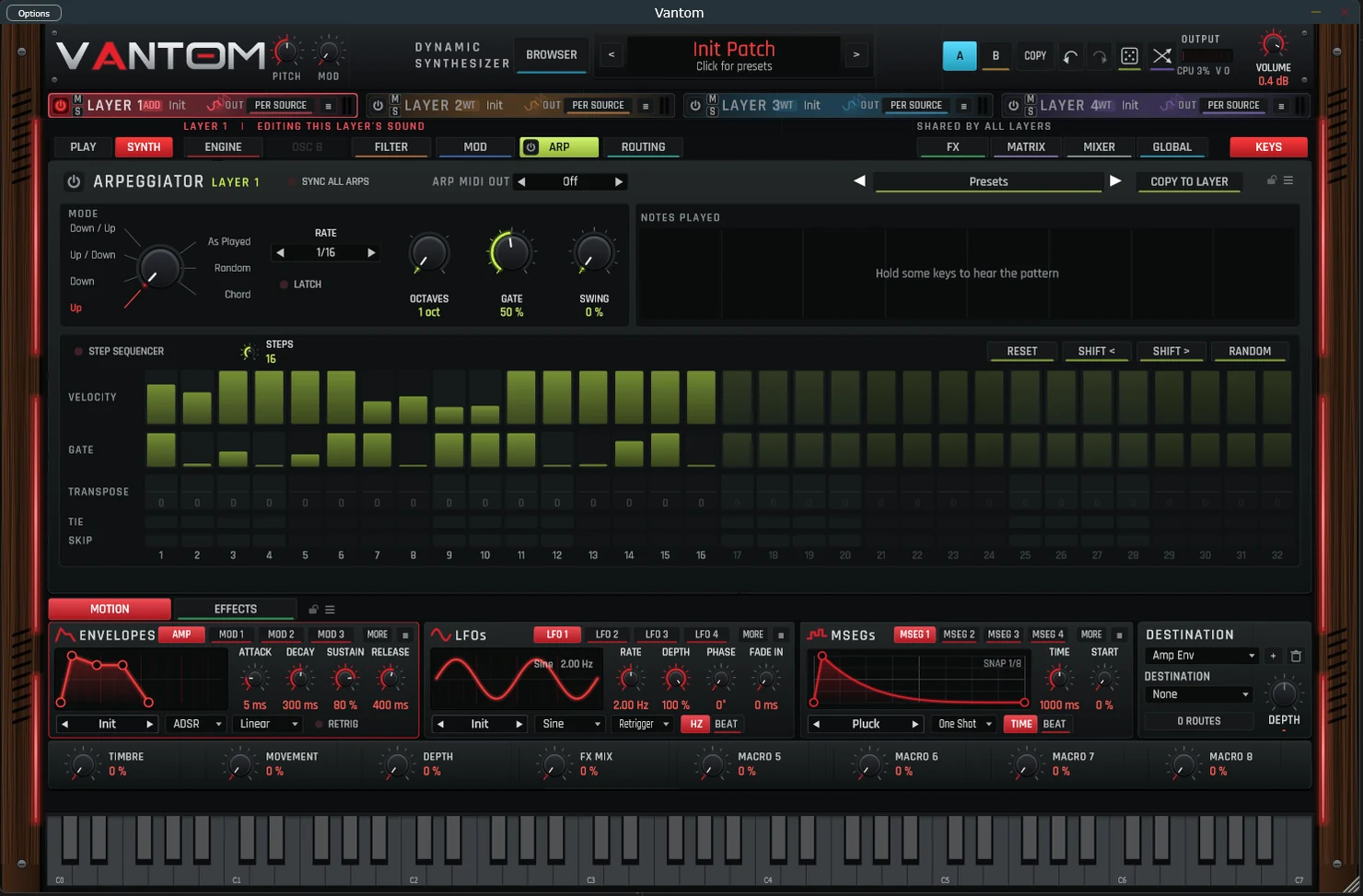
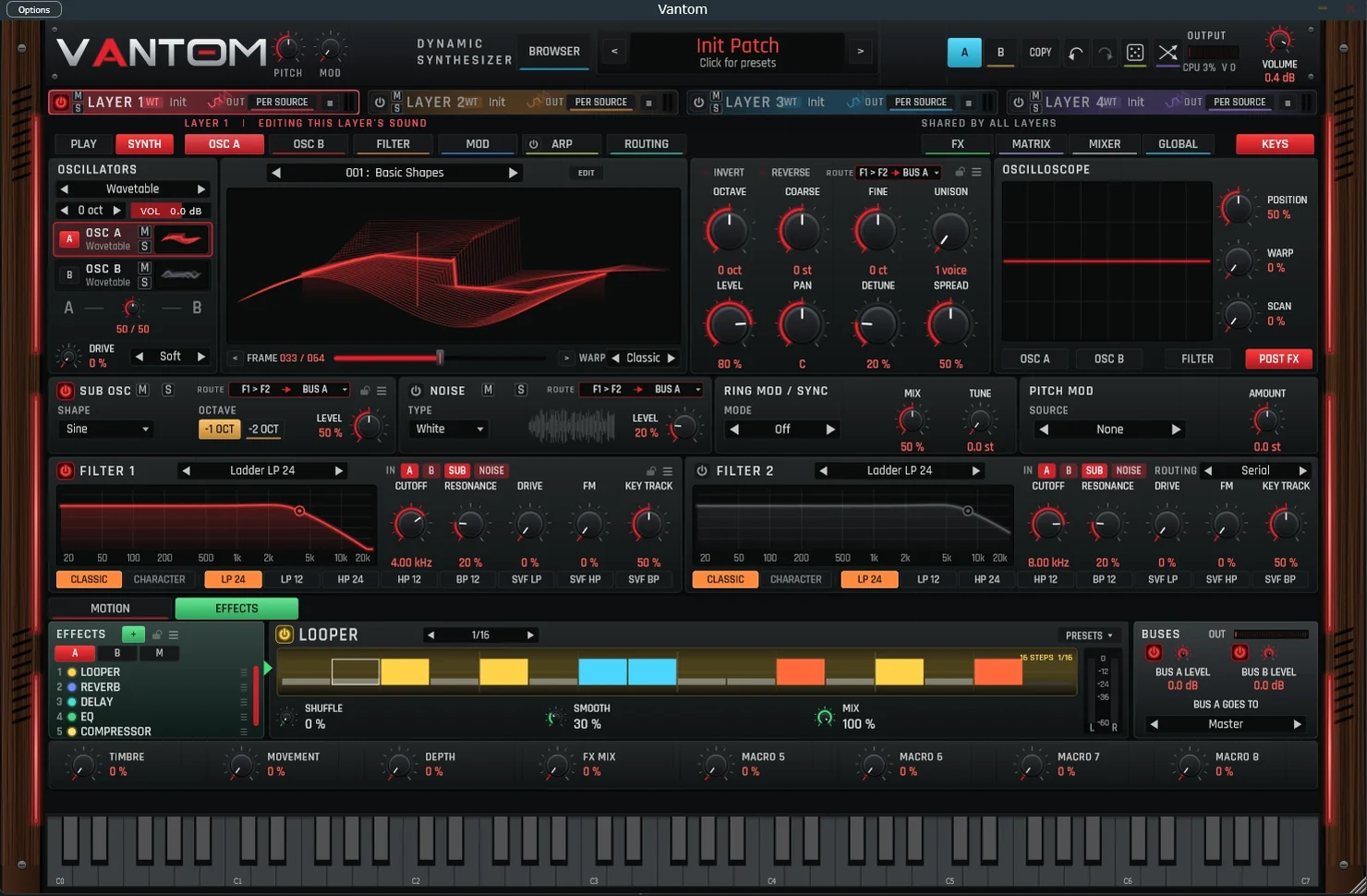
The VANTOM synthesizer interface. Layer 1 uses the wavetable engine, with a 3D wavetable display, oscillator controls, sub oscillator, noise, ring mod and pitch mod sections, two ladder filters, a looper effect with a 16-step pattern, eight macro controls and an on-screen keyboard.
VANTOM, Synth page with the wavetable engine. Work-in-progress build; the interface may change before release.
Overview

One instrument. Four independent sound sources.

VANTOM is a four-layer dynamic synthesizer developed for modern music production. Instead of locking you into one synthesis method, it lets each layer run its own engine: the motion of wavetables, the warmth of analog modelling, the complexity of FM, the precision of additive synthesis, the realism of sampling and the texture of granular synthesis, all in a single patch.

Every layer has its own oscillators, sub oscillator, noise, filters and arpeggiator/step sequencer. Effects, the modulation matrix, the mixer and global settings are shared across all four, and eight macros give you hands-on control of the whole sound.

  1. Engine · Filters · ArpLayer 1
  2. Engine · Filters · ArpLayer 2
  3. Engine · Filters · ArpLayer 3
  4. Engine · Filters · ArpLayer 4

Shared by all layers

  • FX
  • Matrix
  • Mixer
  • Global
  • Macros
Synthesis Engines

Choose the engine. Per layer.

Wavetable

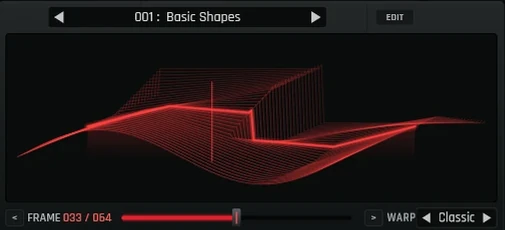
Sweep through the frames of a wavetable to create sound that moves and evolves. A 3D display shows the whole table, warp modes reshape the waveform, and two wavetable oscillators per layer can be blended against each other.

Import your own wavetables to extend the palette beyond the built-in sets.

VANTOM wavetable display showing the Basic Shapes table in 3D at frame 33 of 64, with the warp mode set to Classic.
Feature Breakdown

Built for layer-based sound design.

01

Four-Layer Architecture

Four independent layers, each with its own engine, filters and arpeggiator, with mute, solo and per-layer routing.

02

Six Synthesis Engines

Wavetable (with import), Virtual Analog, FM, additive, sampling and granular (with your own samples), chosen per layer and freely combined.

03

Extra Sound Sources

Every layer adds a sub oscillator, a noise generator, ring mod / sync and pitch modulation.

04

Dual Filters

Two filters per layer: low-pass, high-pass, band-pass and SVF types in Classic or Character modes. Run them in serial, in parallel, split, or per source.

05

Deep Modulation

Amp and mod envelopes, LFOs and multi-segment envelopes (MSEGs), connected through a modulation matrix.

06

Eight Macros

Timbre, Movement, Depth and FX Mix, plus four more assignable macros for performance control.

07

Arpeggiator & Step Sequencer

Up, down, up/down, down/up, as-played, random and chord modes, plus a sequencer of up to 32 steps with velocity, gate, transpose, tie and skip.

08

Arp MIDI Output

Send arpeggiator and sequencer patterns out as MIDI to drive other instruments.

09

Integrated Effects

A reorderable effects chain with reverb, delay, distortion, chorus, a 7-band EQ, compressor, stereo imager, filter and a step looper, plus buses A and B for routing.

10

Play Page

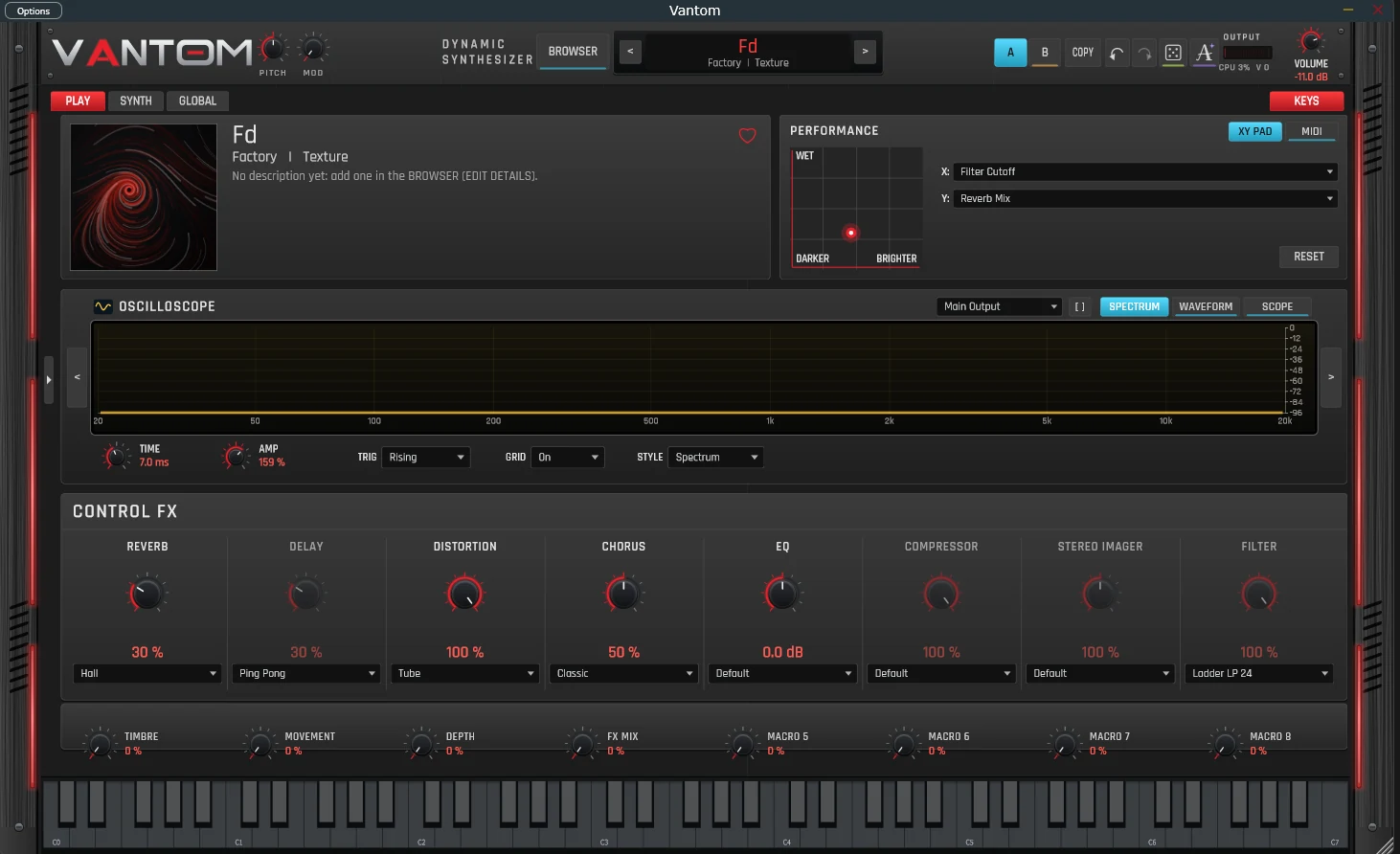
A performance view with an assignable XY pad (for example filter cutoff against reverb mix), a spectrum, waveform and scope display, and one-knob control of each effect.

11

Preset Browser

Search, favorites, factory and user banks, categories and authors, list and detail views, sorting, and a random preset button.
  • A/B compare
  • Undo / redo
  • Randomize
  • Spectrum analyzer
  • Oscilloscope
  • Mixer
  • On-screen keyboard
Audio Demonstrations

Hear VANTOM.

Audio demonstrations recorded directly from VANTOM will be published here as development progresses.

Demos coming soon
0:00
Interface

Screenshots.

Captured from the current development build. Select an image to view it at full size.

Effect editors

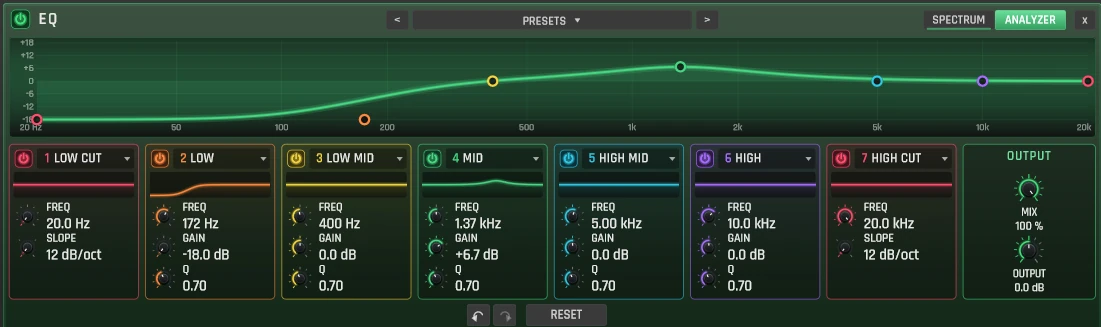
VANTOM EQ editor with seven bands (low cut, low, low mid, mid, high mid, high and high cut), each with frequency, gain or slope and Q, a frequency response curve with analyzer, and mix and output controls.
EQ: seven bands with analyzer
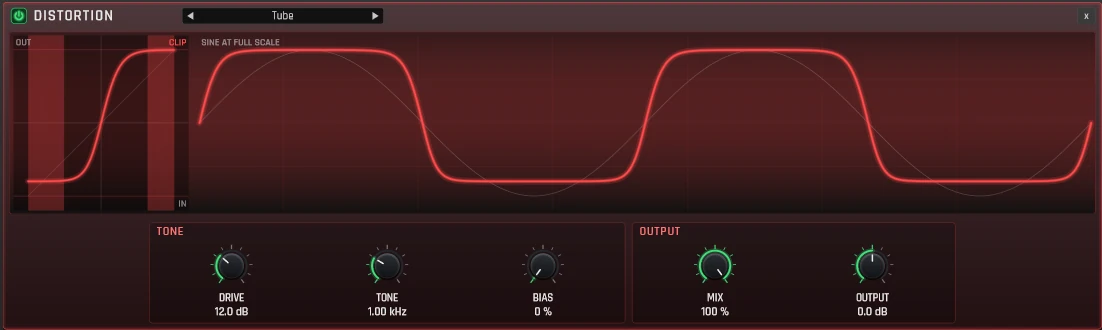
VANTOM distortion editor set to Tube, with a transfer curve and waveform display, and drive, tone, bias, mix and output controls.
Distortion: Tube mode with transfer curve display
Video walkthrough coming soon

Screenshots show a work-in-progress build. Features and interface may change before release.

Status & Specifications

Development status.

Status
In Development
Current Build
1.0.14 test build (Nov 16, 2026)
Full Release
To be announced
Pricing
Test build free · release pricing TBA
System Requirements (test build 1.0.14)
macOSmacOS 11 Big Sur or newer, Apple Silicon and Intel
WindowsWindows installer (requirements to be published)
Plugin formats (macOS)Audio Unit, VST3
Standalone applicationIncluded on macOS
ProcessorTo be announced
MemoryTo be announced
Disk spaceTo be announced
Instrument
Layers4, each with mute, solo and routing
Synthesis enginesWavetable, Virtual Analog, FM, Additive, Sampling, Granular
WavetablesBuilt-in tables, import supported
Additional sourcesSub oscillator, noise, ring mod / sync, pitch mod
Filters2 per layer, with LP, HP, BP and SVF types and serial, parallel, split or per-source routing
ModulationEnvelopes, LFOs, MSEGs, modulation matrix
Macros8
Factory presets167
SequencingArpeggiator plus up to 32-step sequencer per layer
MIDIArpeggiator / sequencer MIDI output
FM engine6 operators, selectable algorithms, per-operator envelopes
Granular engineBuilt-in sources or your own samples; position, scan, spray, pitch, spread, stereo, grain shape, freeze
EffectsReverb, delay, distortion, chorus, 7-band EQ, compressor, stereo imager, filter, step looper; buses A / B
PerformancePlay page with XY pad and one-knob effect controls
Download

Try VANTOM 1.0.14.

The current test build is available for Windows and macOS. It is a work-in-progress release, so expect rough edges, and please tell us what you find.

Test build, not yet code-signed. Windows and macOS will show a security prompt the first time you install it. The steps below explain how to allow it. Back up your projects before using test software in a session that matters.

Windows

Version 1.0.14 · Nov 16, 2026

Package
Installer (.exe) in a .zip
Size
11.2 MB
Download for Windows
Installation steps
  1. Unzip the download and run Vantom-1.0-r.14-2026-11-16-Setup.exe.
  2. If Windows shows “Windows protected your PC”, click More info, then Run anyway.
  3. Follow the installer, then restart your DAW or rescan plug-ins.

SHA-256 4b6969beb0306922aae3087bec02d46c2a07b996e0f2a61d184945bbbbb70b1b

macOS

Version 1.0.14 · Nov 16, 2026

Requires
macOS 11 Big Sur or newer · Apple Silicon & Intel
Includes
Audio Unit, VST3, standalone app, 167 factory presets, user guide (PDF)
Size
30.6 MB
Download for macOS
Installation steps
  1. Double-click the zip to unzip it.
  2. Run Install Vantom.command from Terminal. Because this test build is unsigned, macOS blocks it until you allow it once.
  3. Quit and reopen your DAW. In Logic Pro, choose AU Instruments › Vantom Audio › Vantom.

Full Mac install guide, including Logic Pro setup →

SHA-256 0e7f3b01d47fd00306123000fa52299a2d5f28820d6082bdd7073cf607133def

VANTOM test builds are provided as-is for evaluation. By downloading you agree to the Terms of Service. Downloads are served from GitHub. All versions and release notes.

Mac Install Guide

Installing VANTOM on a Mac.

This test build isn’t signed with an Apple Developer ID yet, so macOS blocks it until you allow it once. The included installer handles that for you. It takes about a minute.

  1. Unzip the download

    Double-click Vantom-1.0-r.14-2026-11-16-Mac.zip in your Downloads folder. You’ll get a folder called Vantom for Mac.

  2. Quit Logic Pro and any other music apps

    Logic checks for new Audio Units when it starts, so it needs to be closed during installation. Use Logic Pro › Quit Logic Pro (⌘Q).

  3. Run the installer from Terminal

    Open Terminal (Applications › Utilities › Terminal). Type bash followed by a space, drag Install Vantom.command from the Vantom for Mac folder into the Terminal window, then press Return. When it finishes, it prints “Done. Vantom is installed”.

    Running it this way avoids the Gatekeeper prompt. You can also double-click Install Vantom.command. If macOS says it can’t be opened, open System Settings › Privacy & Security, scroll down, click Open Anyway, confirm with your password, and double-click it again.

    What the installer does
    • Copies the Audio Unit to ~/Library/Audio/Plug-Ins/Components/ and the VST3 to ~/Library/Audio/Plug-Ins/VST3/
    • Copies Vantom.app to Applications and the factory presets to ~/Documents/Vantom/Presets/ (existing presets are never overwritten)
    • Removes macOS’s download quarantine flag from those files, so the unsigned build can load
    • Restarts macOS’s Audio Unit registration service so Logic sees VANTOM straight away
  4. Open Logic Pro and load VANTOM

    Start Logic Pro. The first launch after installing takes a few seconds longer while Logic validates the new plug-in. Then create a software instrument track (Track › New Software Instrument Track), click the Instrument slot, and choose AU Instruments › Vantom Audio › Vantom.

Logic Pro

If VANTOM doesn’t appear in Logic Pro

Logic only lists Audio Units that pass its validation scan. Work through these in order, checking Logic after each one.

  1. Rescan in the Plug-in Manager

    In Logic, open Logic Pro › Settings › Plug-in Manager. Search for Vantom, select it, and click Reset & Rescan Selection. Make sure the Use checkbox is ticked.

    If the status column says failed validation, you can still tick Use to load it. Please let us know if that happens, and include your macOS and Logic versions.

  2. Check that macOS sees the Audio Unit

    Paste this into Terminal and press Return:

    auval -a | grep -i vantom

    You should see a line ending in Vantom Audio: Vantom. If nothing appears, the installer didn’t run: go back to step 3 above. To run the same validation Logic uses, paste the next command. It should end with AU VALIDATION SUCCEEDED.

    auval -v aumu Gnss Gnsa
  3. Clear the quarantine flag again

    If the plug-in was copied by hand, or macOS still blocks it, quit Logic and run:

    xattr -dr com.apple.quarantine ~/Library/Audio/Plug-Ins/Components/Vantom.component ~/Library/Audio/Plug-Ins/VST3/Vantom.vst3
  4. Reset the Audio Unit cache

    Quit Logic, then run these two commands. macOS rebuilds the cache automatically the next time Logic starts, and every Audio Unit will be rescanned once.

    killall -9 AudioComponentRegistrar; rm -f ~/Library/Caches/AudioUnitCache/com.apple.audiounits.cache
  5. Restart your Mac

    If VANTOM still isn’t listed, restart the Mac once and open Logic again.

VANTOM is a universal build, so it runs natively on Apple Silicon and on Intel Macs, and also works if Logic is set to open using Rosetta. GarageBand uses the same Audio Unit: look under Plug-ins › AU Instruments › Vantom Audio.

Other DAWs (Ableton Live, Bitwig, Cubase, FL Studio, Reaper)

These use the VST3 version, installed to ~/Library/Audio/Plug-Ins/VST3/. Restart the DAW or run its plug-in rescan. If your DAW only scans system folders, add that folder in its plug-in settings.

Install by hand instead of using the script

Copy Vantom.component to ~/Library/Audio/Plug-Ins/Components/, Vantom.vst3 to ~/Library/Audio/Plug-Ins/VST3/, Vantom.app to /Applications/, and the contents of the Presets folder to ~/Documents/Vantom/Presets/. Then remove the quarantine flag:

xattr -dr com.apple.quarantine ~/Library/Audio/Plug-Ins/Components/Vantom.component ~/Library/Audio/Plug-Ins/VST3/Vantom.vst3 /Applications/Vantom.app

Your Library folder is hidden: in Finder, choose Go › Go to Folder… and type the path.

Updating from an earlier test build

Quit Logic, then run the new version’s installer. It replaces the old plug-ins and app and keeps your presets. When Logic next starts, it validates the updated plug-in again.

Uninstalling

Quit your DAW, then run:

rm -rf ~/Library/Audio/Plug-Ins/Components/Vantom.component ~/Library/Audio/Plug-Ins/VST3/Vantom.vst3 /Applications/Vantom.app ~/Applications/Vantom.app

Your presets in ~/Documents/Vantom/ are left in place. Delete that folder too if you don’t need them.

Release Updates

Get notified about new versions.

New test builds and the full release will be announced by email. Purchasing and licensing will open with the full release.

We will only use your email for VANTOM news. See our Privacy Policy.